
Introducing Mathify.dev: Create math animations by chatting with AI

I want to share a new product I’ve been building:
Mathify.dev — create math animations by chatting with AI.
Try it at: mathify.dev
The idea is simple: instead of writing animation code from scratch, you describe what you want, and Mathify generates (and renders) the animation for you — with the code available if you want to tweak it.
To show what that feels like, here’s the exact kind of demo I like to run.
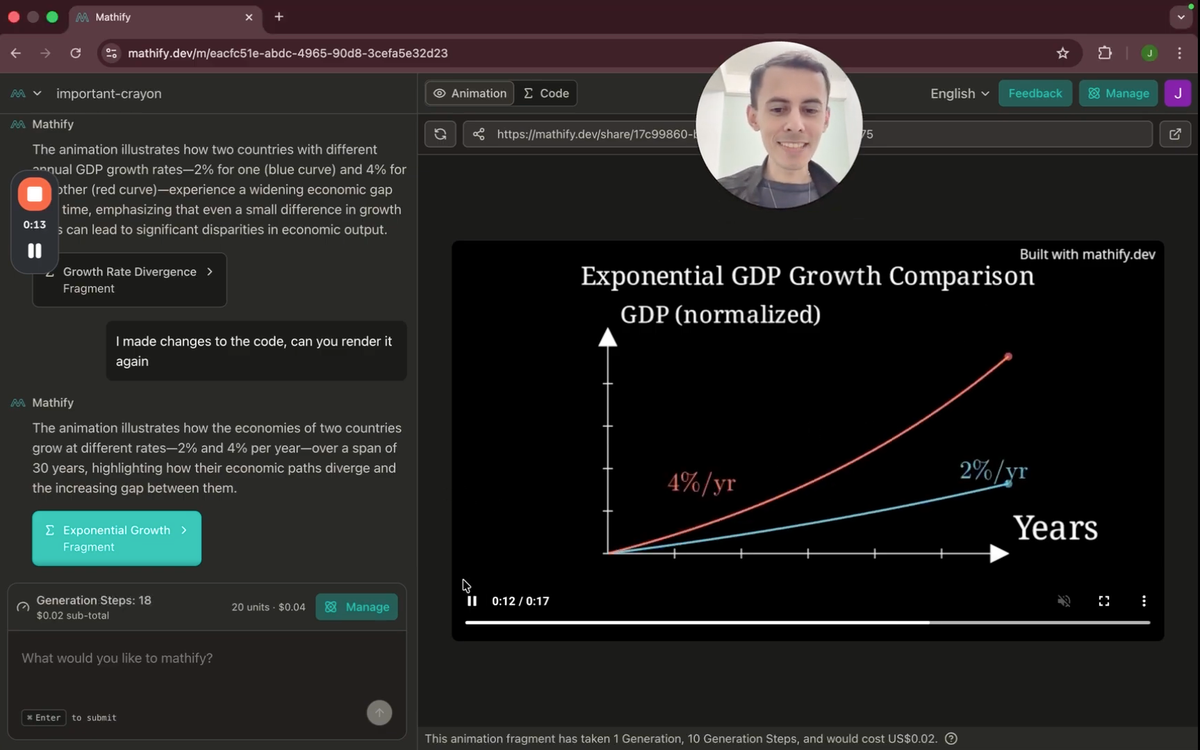
A quick example: exponential growth (GDP, 2% vs 4%)
I like economics, so I asked Mathify to animate something that’s easy to describe but genuinely useful:
- Compare two countries as two lines on a chart.
- One country grows at 2% per year, the other at 4% per year.
- The goal is to show how a “small” difference compounds into a huge gap over time.
Because that’s the point: 2% vs 4% sounds like “just double”, and over a short horizon it doesn’t feel dramatic. But across decades, it becomes visually obvious.
So I prompt it, hit run, and you can literally watch the pipeline:
- it clears and writes files
- validates the script
- renders
- and then generates a clean response + title
It takes about a minute, and then you get the animation.
First render: surprisingly solid
When the result came back, I was honestly happy with it right away:
- Labels like “2% per year” and “4% per year” were placed nicely.
- The chart makes the widening gap clear.
- It even adds a note like “gap widens” to reinforce the idea.
Already, that’s a usable explanatory visual.
But the more interesting part is what happens next.
Iteration: tweak the animation without the “animation pain”
Once you have a first render, you almost always want small adjustments:
- move a label so it doesn’t overlap
- reduce font sizes
- simplify extra text
- remove unnecessary axis units (because it’s conceptual)
- clean up the end-of-line value labels
And Mathify supports two ways to do that:
1) Ask for changes in plain English
Instead of editing code yourself, you can say:
- “Move the red label to the left.”
- “Move the blue label slightly to the right.”
- “Reduce the font size of ‘gap widens’.”
- “Remove the extra words.”
Then you rerender.
2) Edit the code directly (if you want full control)
The code is there, and changes are saved in real time.
In my demo, I did both: I asked for some modifications, then made a quick code edit (adding a line break in a LaTeX label), and told Mathify:
“I made changes to the code — can you render again?”
It re-renders the latest fragment.
The moment that felt “alive”: I made a mistake and it fixed it
This was the coolest part of the demo.
When I edited the code, I accidentally used a line-break syntax that isn’t valid in LaTeX. Normally that would mean:
- you run it
- it breaks
- you dig through errors
- you go down a rabbit hole
But here, Mathify:
- validated the script
- detected the failure
- fixed the LaTeX syntax properly
- and then rendered successfully
So the system didn’t just “execute” — it collaborated. That’s the first time I got that very specific feeling:
“Okay… this is starting to take life.”
Try it and tell me what breaks (seriously)
Mathify is still early, and feedback is gold.
If you try it out and tell me:
- what confused you
- what you expected
- what you wish it did
- what types of animations you’d use it for
…that directly helps shape the product.
Try it here: mathify.dev
And if you have comments, I’d be genuinely thankful.